Control selection area
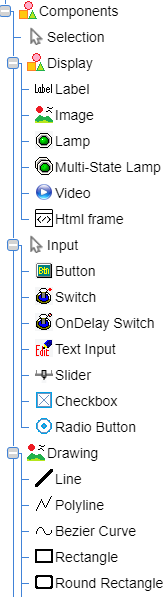

The Control Selection area displays the list of controls as a tree.
First select the control to place on the Layer area and then place it with one of the following three methods.
1. Drag and drop a control to place it on the Layer area.
2. Drag the mouse on the Layer area to place the selected control.
The control will be placed at the position where you start dragging the mouse, and the size of the control will be determined by where you stop dragging the mouse.
3. Click the Layer area to place the selected control.
The position of the control is determined by the first click, and the size of the control is determined by the second click.
If Draw the same components continuously. is selected in the Options menu, the same control will be selected in the Control Selection area after it has been placed on the Layer area.