Layer area
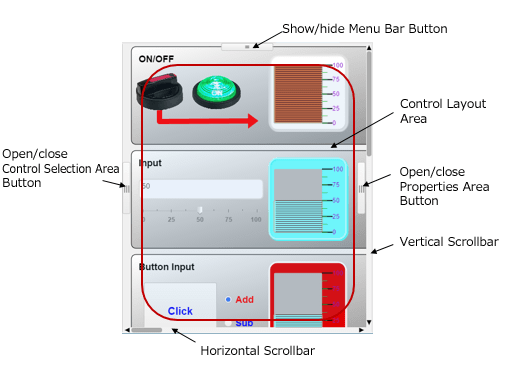
The Layer area is where you can place controls.
The size and background of the Layer area can be configured using the Layer properties area.
You can create multiple layers and overlap them.
■ Control Layout area
Controls are placed on this area.
■ Vertical scrollbar
The vertical scrollbar is used when the area cannot be completely displayed in the vertical direction. Drag the scrollbar to move the displayed area.
■ Horizontal scrollbar
The horizontal scrollbar is used when the area cannot be completely displayed in the horizontal direction. Drag the scrollbar to move the displayed area.
■ Show/hide menu bar button
The menu bar is hidden or displayed with each click of this button.
■ Open/close Control Selection area button
The Control Selection area is hidden or displayed with each click of this button.
■ Open/close Properties area button
The Properties area is hidden or displayed with each click of this button.